Your DJ Online Booking Portal: A Simple Guide to Planning Your Night

Prices and booking
Your DJ Online Booking Portal: A Simple Guide to Planning Your Night
By Tim Daymond, DJ since 1976 · Updated 22 October 2026 · 6 minute read
Norfolk’s Only Trading Standards Approved DJ · Rated 4.9 out of 5 from more than 250 reviews

A good DJ online booking portal takes the paperwork and stress out of planning. Instead of searching through old emails, you find everything in one tidy place, available day and night.
I’m Tim Daymond, and I’ve been a DJ since 1976. So I’ve seen planning move from handwritten notes to smartphones, and this portal is the best system I’ve used. Below, I explain exactly how everything works, from your first click to the final confirmation.
Using My DJ Online Booking Portal, Step by Step
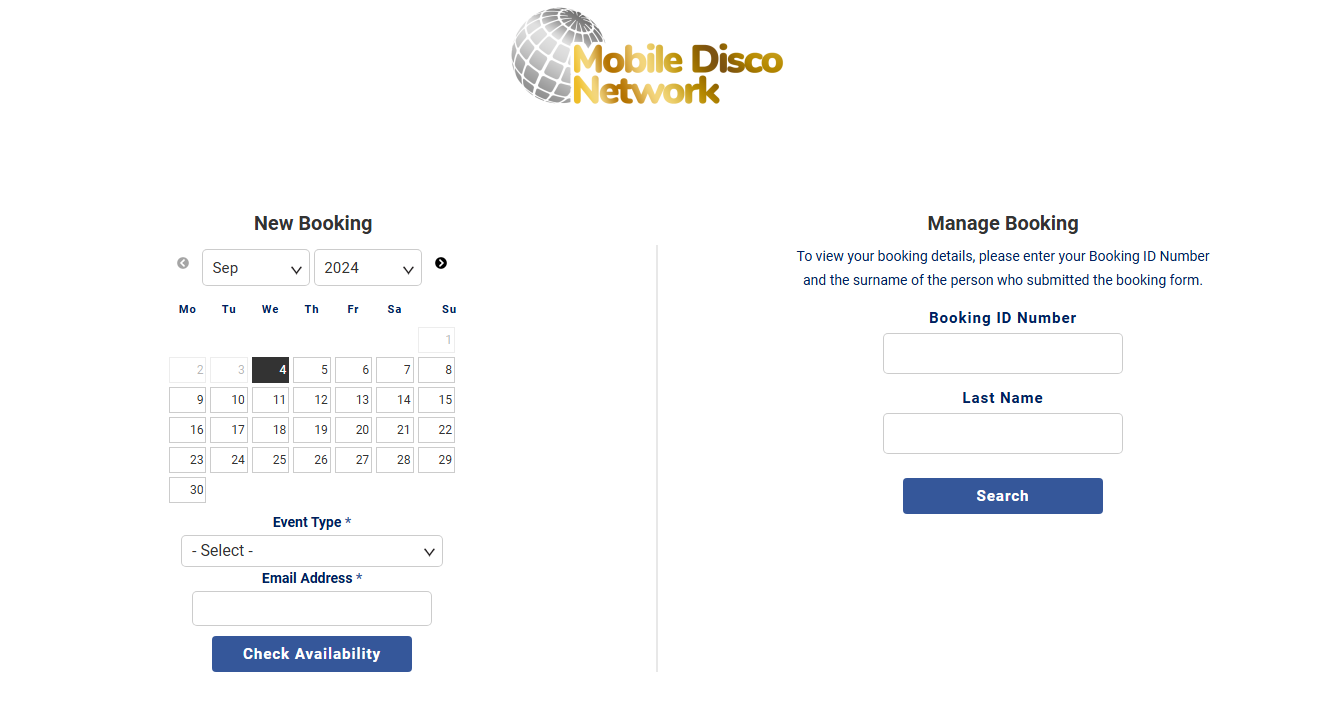
- Choose your date. Start on my availability checker.
- Choose your event type. For example, pick a wedding, birthday or children’s party.
- Enter your email address. That way, your proposal and updates reach you directly.
- Choose your package. Select the package that suits your celebration and budget.
- Add your event details. Share your venue, timings and approximate guest numbers.
- Pay your deposit securely. A 45% deposit by card or bank transfer reserves your date.
- Receive your login details. Finally, an automatic email arrives with everything you need.
Not sure which package fits? Then my package guide helps you decide.
Logging In to Your Account
Your confirmation email contains a unique login ID. So simply enter that ID with your surname, and your account opens.
The portal works beautifully on phones, tablets and computers. Therefore, you can update your playlist during a lunch break or from the sofa. It also saves your changes automatically, so nothing gets lost.
Lost your email? Then simply contact me, and I’ll resend your details the same day. Your information stays private, so only you can see your account.
Inside Your DJ Online Booking Portal
Your account contains several clearly labelled folders. Here’s what each one does.
- Bookings: review your confirmed dates and add extra appointments.
- Files: download my public liability insurance and PAT certificates for your venue staff.
- Invoice: see your costs, which update automatically after every payment.
- Contract: read and sign your contract electronically.
- Forms: complete your playlist form with must-plays and do-not-plays.
- Confirmation: check your event details are correct.
Also, discounted extras appear in your portal after booking, so you can upgrade whenever you like. For instance, you might add uplighters, a confetti cannon or a round of Boogie Bingo.
Planning Your Music
The music section lets you search an extensive, professionally licensed music library. If you already have a Spotify playlist, you can copy the song names into the search instead.
You can also share a guest request link before the night, while you keep the final say. Then, on the night itself, guests can request songs from their phones by QR code.
Tim’s tip: Start your playlist form early, and add songs whenever they pop into your head. As a result, it’s nearly finished by the time we talk.

Photo Booth Settings
Booked my vintage selfie pod? Then three extra folders appear. You choose an animated start screen, a photo booth template and a backdrop.
Every picture is digital, so guests can share them instantly. Plus, discounted extras for the pod appear alongside these settings. Meanwhile, your chosen photo booth template adds your names and date to each shot.
Prefer a Phone Call?
However, not everyone enjoys booking online, and that’s absolutely fine. Simply call me on 01760 722283, and I’ll guide you through each step personally.
Because I’m Trading Standards Approved, the portal also follows fair contract terms. Want to spread the cost? Then read about my monthly payment plans.
Free Planning Tools to Use Alongside
The portal handles your booking, while these free tools help with everything else. They all work on your phone.
 DJ Must-Play & Do-Not-Play ListFavourites and no-go songs on one sheet for your DJ.Use it free →
 Wedding Day Timeline BuilderPlan your day hour by hour, from ceremony to last dance.Use it free →
 Party Planning TimelineEvery job in order, from first idea to party night.Use it free →
 Photo Booth Pose WheelSpin for a fun pose idea in the selfie pod.Use it free →
Want more? Then browse my free party toolbox and free wedding toolbox.
DJ Online Booking Portal: Your Questions
When do I receive my login?
Your login details arrive by email within minutes of paying your deposit.
Can I manage two events with one login?
Yes. For example, a wedding and a later party both sit in the same account.
Can guests suggest songs?
Yes, you can share a guest request link, and you still approve the final list.
Where are your insurance certificates?
Your PAT certificates and insurance documents sit in the Files folder, ready to send to your venue.
What if I get stuck?
Just call or email me, and I’ll talk you through it.
About the author
Tim Daymond (Tinsel Tim) has been a DJ since 1976 and founded Mobile Disco Network in 2013. He plays every booking himself across Norfolk, Suffolk, Cambridgeshire and Lincolnshire.
Start With the DJ Online Booking Portal Today
Busy dates fill quickly. So check your date now, or call me for a friendly chat.