
A Toolkit Built For Every Visitor
Every page is built with proper screen-reader support: semantic headings, descriptive alt text and accessible forms. Each page also has an on-site toolkit. It offers 50+ language translation, a read-aloud tool, dyslexia-friendly fonts, and profiles for epilepsy, ADHD and low vision. Below is exactly what's included and how to use it.
What The Toolkit Actually Includes
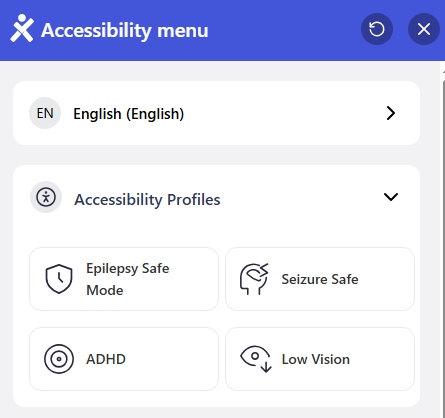
Every page on this site carries a small accessibility icon. Clicking it opens the panel shown below — here's exactly what each part does.
Accessibility Profiles
Instead of adjusting individual settings, you can switch on a ready-made profile in one click:
- Epilepsy Safe Mode — removes flashing content and reduces the risk of triggering seizures
- Seizure Safe — a stricter version for anyone particularly sensitive to motion and flashing
- ADHD — reduces distractions and helps focus on the content that matters
- Low Vision — boosts contrast and text size automatically
A language switcher sits at the very top and translates the whole site into 50+ languages. That includes right-to-left scripts like Arabic and Hebrew.
Content Adjustments
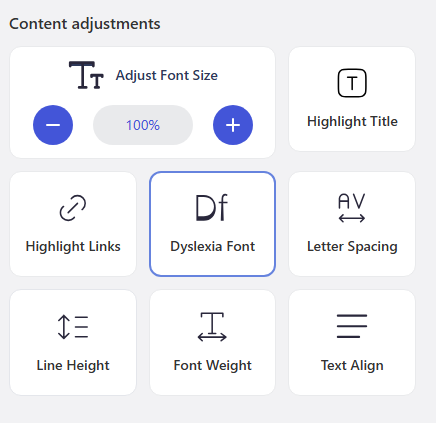
Fine-grained control over how the text itself appears:
- Adjust Font Size — scale text up or down from 100%
- Dyslexia Font — switches to a typeface designed to be easier to read for people with dyslexia
- Highlight Title / Highlight Links — makes headings and clickable links visually stand out
- Letter Spacing, Line Height & Font Weight — independently adjustable for easier reading
- Text Align — change how paragraphs are aligned on the page
Colour & Navigation Adjustments
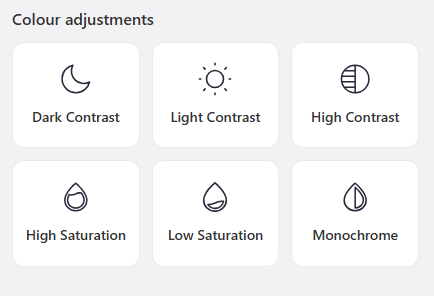
Beyond text, the whole page's appearance and behaviour can be changed:
- Dark Contrast, Light Contrast & High Contrast — three different colour modes to suit different vision needs
- High Saturation, Low Saturation & Monochrome — adjusts colour intensity across the whole page
- Page Read — reads the page content aloud, a genuine text-to-speech tool built directly into the site
- Reading Guide — a moving highlight bar that follows your reading line
- Mute Sounds & Pause Animations — stops any moving or audible content
- Big Cursor — a larger, easier-to-see mouse pointer
Built In, Not Bolted On
Beyond the visible toolkit, every page on this site is built with proper semantic HTML and descriptive image alt text. Forms are clearly labelled and headings follow a logical order. These are the basics that make a site genuinely usable with a screen reader, not just technically compliant.
Key content is also marked up with Speakable schema. This structured-data standard helps voice assistants find and read aloud the most important information on each page.
Other Ways To Get In Touch And Engage
Beyond the toolkit above, the site has several other tools. They give you more than one way to communicate, book and take part.
Video Testimonials
Record and send a video review in your browser on the Reviews page. No separate app or account needed.
Leave A Voice Message
Prefer speaking to typing? Record a short voice message instead of filling in a written form.
Live QR Song Requests
On the night, request songs from your own phone by scanning a QR code. No app to download, no queueing at the booth.
WhatsApp Chat
Message Tim directly on WhatsApp from any page, rather than filling in a contact form and waiting for a reply.
Visible Phone Number
The phone number is shown as plain, tappable text on every page. It's never hidden behind an icon that needs interpreting.
Live Availability Calendar
Check real, up-to-date availability yourself, any time, without needing to phone or email first.
Accessibility Questions
Do I need to install anything to use these tools?
No. Every tool is built into the website. Click the accessibility icon in the corner of any page and the panel opens instantly. There's nothing to download or set up.
Will my settings be remembered if I come back later?
Yes, your chosen settings are saved in your browser, so they'll still be applied the next time you visit.
Is this available on every page of the website?
Yes, the full toolkit is available on every page, including every service page and the homepage.
Will this work with the screen reader I already use?
It should. The site uses standard, semantic HTML, descriptive alt text and proper ARIA labelling throughout. It's designed to work with whatever screen reader you already use. That includes VoiceOver on Mac and iPhone, TalkBack on Android, and NVDA or JAWS on Windows. There's no need for a separate accessible version of the site.
What if I find something on the site that isn't accessible?
Let Tim know directly — by phone, email, WhatsApp, or the voice message option on the Contact page. The full commitment behind this toolkit, including how issues are handled, is set out in the Accessibility Promise.
Practical Tips for Using the Accessibility Panel
The panel has a lot of options, and you don't need all of them at once. These tips help you find a comfortable set-up quickly and keep it working for you.
Start with a profile, then fine-tune
If one of the ready-made profiles is close to what you need, switch that on first. Low Vision, for example, raises contrast and text size in one step. Then use the individual controls to adjust anything that still isn't quite right, such as line height or letter spacing. Change one thing at a time and read a paragraph after each change. You'll see which setting actually makes the difference for you.
Making long pages easier to read
Service pages on this site can be long, with packages, frequently asked questions and reviews. The Reading Guide bar helps you keep your place line by line. Highlight Title makes headings stand out, so you can scan down to the section you want. If moving content is distracting, Pause Animations stops it. Many readers find the dyslexia-friendly font more comfortable with slightly wider line height and left-aligned text.
Listening instead of reading
Page Read reads the content aloud in your browser. It's useful if reading for long periods is tiring, or you'd rather listen while doing something else. If you already use a screen reader such as VoiceOver, TalkBack, NVDA or JAWS, carry on using it as normal. The site's headings, labels and alt text are built to work with it. You may find it easier to use one tool at a time rather than both together.
Settings on shared or different devices
Your choices are saved in the browser you used, so they'll be there next time on that device. On a different phone, tablet or computer, or in a private browsing window, you'll need to choose them again. On a shared or public computer, such as one at a library, switch your settings off before you leave. The next person then starts with the standard view, and you aren't caught out when you return.

From Tim
A word from Tim Daymond
I want everyone to be able to find out about a booking, check a date and get in touch without struggling. That's why every page has the accessibility toolkit. It's also why you can reach me in more than one way: phone, WhatsApp, a voice message or the screen-reader friendly enquiry forms. If something on the site doesn't work for you, please tell me directly. I'd much rather hear about it and put it right than lose an enquiry because a page got in the way.
DJ since 1976. Running Mobile Disco Network since 2013. Norfolk County Council Trading Standards Trusted Trader. NADJ member.
Check your date →Useful next
- Sensory-friendly disco hire for SEN groupsHow events themselves are adapted, from lighting to volume and games.
- Ways to get in touch with TimPhone, email and voice message options in one place.
- Help and support centreStraight answers on coverage, insurance, QR requests and payments.
- Read reviews or record a video reviewWhere the in-browser video testimonial option lives.
- General booking questions answeredCovers the common questions before you enquire.
Website Accessibility: The Key Facts
- Website accessibility here includes full screen-reader support and keyboard navigation.
- The website accessibility toolkit translates every page into 50+ languages.
- Website accessibility profiles include Epilepsy Safe Mode, ADHD and Low Vision.
- If any website accessibility feature does not work for you, call 01760 722283 and Tim will help.